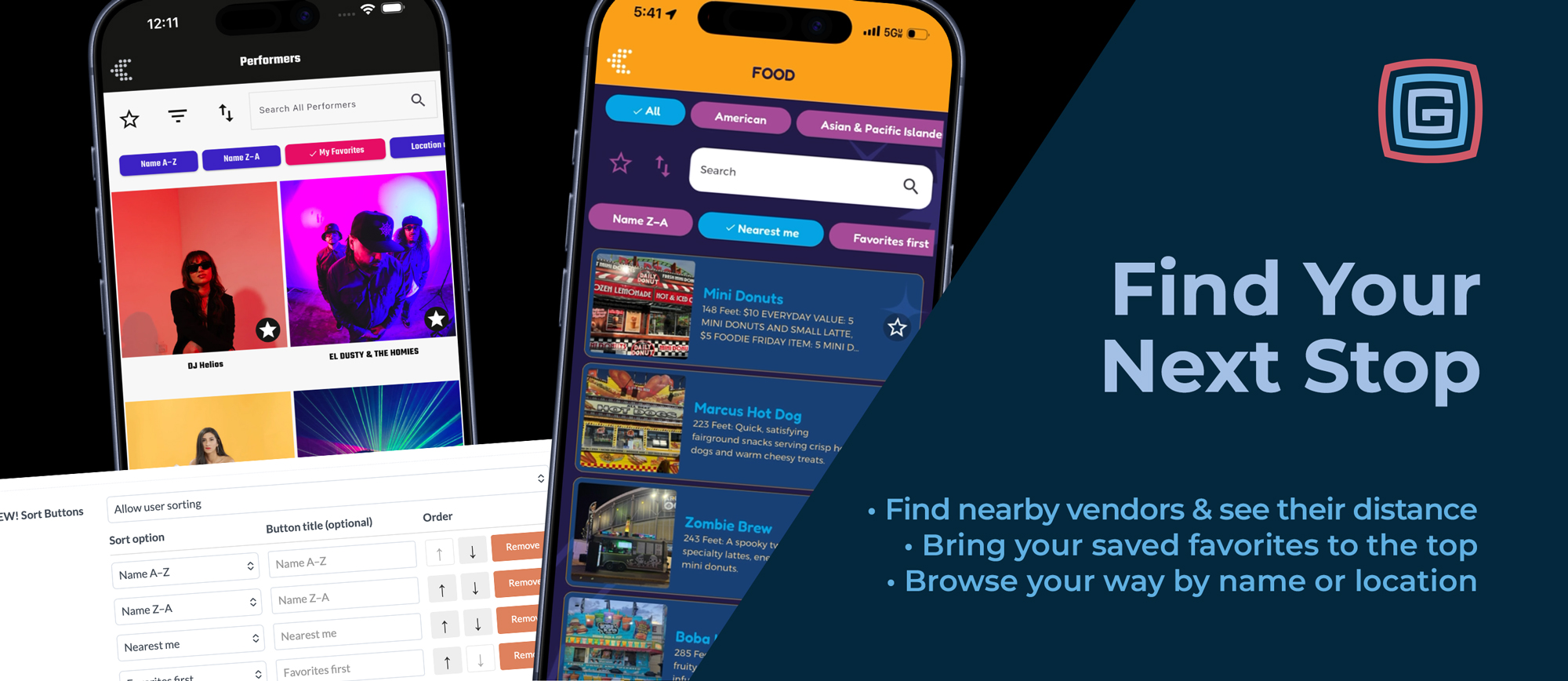
You have 30 minutes before the next concert, a few food vendors you’ve been meaning to try, and an appetite that makes walking across the entire fairgrounds less appealing. Which stop is closest?
With Grandstand’s List Sorting, attendees can sort food vendors by Nearest, see their distance, and choose what sounds good nearby. It’s a simple way to spend less time searching and more time enjoying the event.
And nearby food is just the beginning. From finding an exhibitor by name to bringing saved favorites to the top, List Sorting gives attendees more ways to explore the information in your app.
List Sorting is included with Gold, Platinum, and Titanium for apps built or updated after October 1, 2026.
A Different Way to Browse for Every Moment
What attendees need from a list can change throughout the day.
Before arriving, they might browse vendors alphabetically to find a business they recognize. During the event, proximity becomes more useful: What can we check out near here? Before leaving, their favorites can help them revisit the stops they most wanted to make.
List Sorting lets them adjust as they go. A tap of the sort button opens the available options, making it easy to choose a different order. Selecting an item still opens its familiar detail page.
Every list can support sorting, so organizers can offer useful choices across food, shopping, exhibitors, attractions, performers, and more.
Find What’s Nearby with Nearest
At a large event, knowing what’s available is only part of the decision. Knowing what’s close can help attendees make the most of the time they have.
The Nearest option uses the attendee’s current GPS location to arrange locations by proximity and display their distance. Someone looking for lunch can compare nearby food vendors. A family with time between activities can find another attraction in the area. A shopper can discover a vendor close to where they’re already standing.
It can also introduce attendees to something they hadn’t planned to visit. A nearby stop might become an easy addition to the day simply because it’s convenient to explore.
Distances are measured in a straight line from the attendee’s location. They provide a quick proximity reference; actual walking distances will vary with paths, entrances, and the event layout.
Bring Favorites Back into Focus
Saving a favorite is a great way to remember something. Sorting by Favorites First makes those saved items easier to find when it’s time to act.
An attendee might save several food vendors before arriving, then bring them to the top when the group starts discussing lunch. Someone browsing exhibitors can quickly return to the businesses they wanted to visit. Before heading home, attendees can check their favorites for any remaining must-sees.
Their saved selections become a practical starting point for deciding what comes next.
Find a Name or Browse by Location
Sometimes attendees know exactly what they’re looking for.
Sorting by Name gives them an alphabetical view, whether they’re finding a familiar vendor, checking for a particular exhibitor, or looking up a performer recommended by a friend.
Location Name offers another way to explore. For lists using booth numbers, building names, or other location labels, this option can help attendees browse according to where items are located.
Together, these choices make the same list useful for different tasks: finding a known name, exploring nearby options, or working through stops by location.
Your Starting Order Still Matters
Organizers often have a reason for the way a list first appears. A performer list might feature headliners first. A vendor list might follow a manually arranged order.
The Default sorting option preserves that initial arrangement, giving attendees a way to return to the organizer’s intended order after trying another view.
Organizers also control the sorting menu itself:
- Available options: Choose which sorting methods appear in each list.
- Custom labels: Determine what each sorting option is called.
- Menu order: Arrange the options in the order that makes sense for your event.
A list can offer the choices that fit its content, with labels suited to your audience.
Pick Up Where You Left Off
Attendees shouldn’t have to reset their preferred view every time they return.
The app remembers the sorting selection separately for each list. If someone sorts food vendors by Nearest, leaves to check the schedule, and comes back, Nearest is still selected. Another list can retain a different choice.
That small convenience helps the app stay useful throughout a busy day, as attendees move between planning, browsing, and exploring.
More Ways to Make the Event Their Own
An event brings together people with different interests, priorities, and amounts of time. Giving them a choice in how they browse helps each person find what matters in the moment.
With List Sorting, attendees can find a nearby stop, revisit their favorites, locate a familiar name, or return to your curated order—all within the same list.
Available with Gold, Platinum, and Titanium for apps built or updated after October 1, 2026.