
Published September 23, 2026
The concert you can’t miss. The dessert you spotted three weeks ago. The exhibitor you promised yourself you’d visit.
There’s a lot to keep track of at an event. Grandstand’s favorites help guests remember the good stuff—and turn those discoveries into a plan.
Saving a favorite fits naturally into exploring the app. Guests can save an event while browsing the schedule, a menu item while checking out food options, or a vendor while exploring the map. Their choices connect throughout the app, ready when they need them.
And guests put those stars to work. At some Grandstand events, activity reaches hundreds of thousands of vendor favorites and hundreds of thousands of individual food-item favorites. That’s a lot of “let’s try this”—and valuable insight for organizers.
When something catches a guest’s attention, saving it should be easy.
Grandstand puts favorites where those discoveries happen: schedule listings, event details, vendor listings, vendor details, and vendor locations on the map.
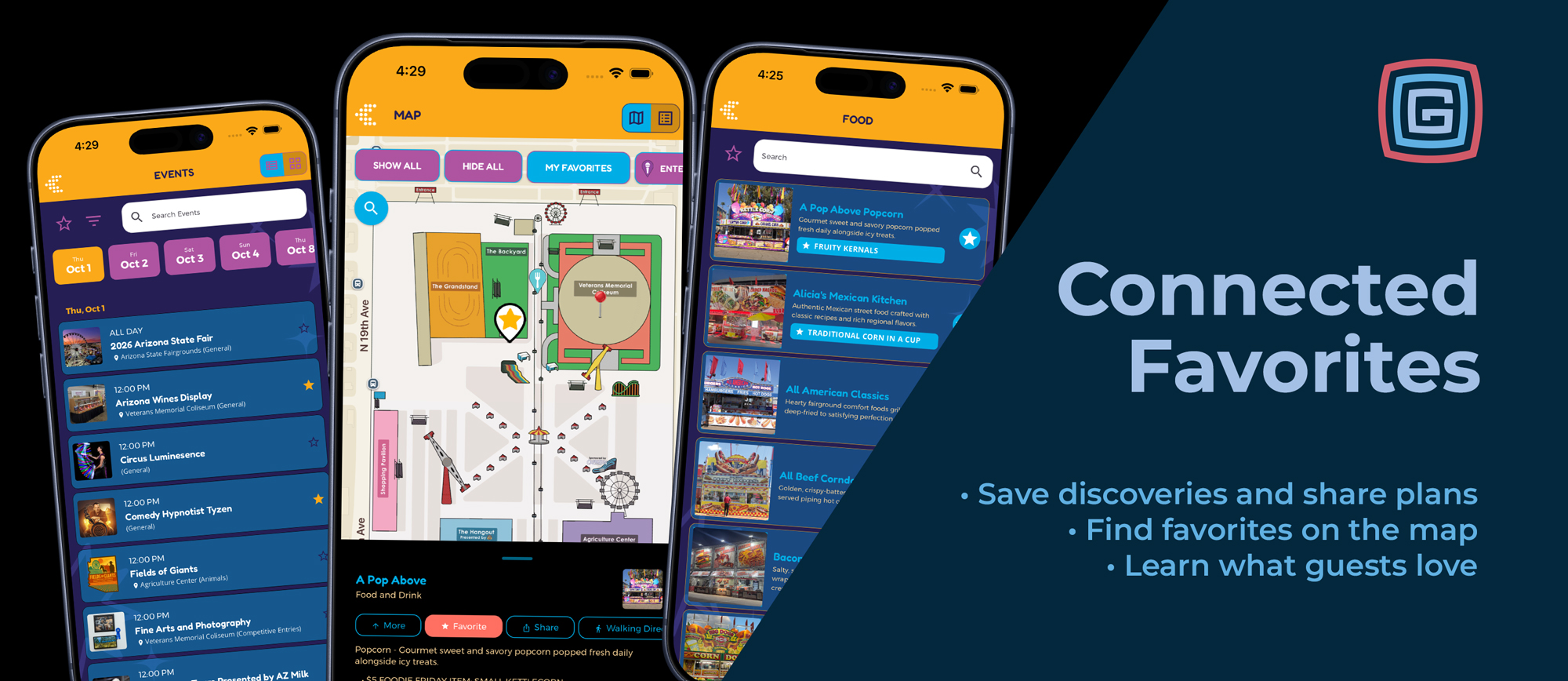
The Arizona State Fair app offers a great example. A guest browsing the schedule can star Comedy Hypnotist Tyzen or Arizona Wines Display directly from the event listing, with the time and available location information right there.
There’s no need to interrupt browsing to start a separate plan. Guests keep exploring, and their favorites grow along the way.
“Which booth had that dessert?”
Individual item favorites help guests remember the details. They can save specific food, menu, or other items within a vendor’s listing. Their saved selections now appear right on the list page, making it easy to remember both where they wanted to go and what caught their eye.
In the Arizona State Fair app, for example, a guest can save Traditional Corn in a Cup from Alicia’s Mexican Kitchen and see that selection displayed directly beneath the vendor. The next time they browse the food list, their must-try item is easy to spot.
Saving an individual item also automatically favorites its vendor, keeping the food and the place to find it together.
A vendor favorite says, “Let’s stop here.” An individual item favorite adds, “And this is what I’m getting.”
Grandstand’s enhanced unified Favorites page brings saved schedules and lists into one place.
A festival guest might collect performances, food vendors, and a few must-try dishes. A conference attendee might save sessions and exhibitors. A family visiting a fair might build a collection of activities and stops everyone has picked out.
Planning can start as soon as the content is available. Guests can browse in the weeks before an event, save their discoveries, and pull up those favorites when they arrive.
Schedule reminders help keep the plan on track. Depending on the app’s configuration, guests can choose a reminder for a saved event, or favoriting can automatically schedule one before it begins. Remove the event from favorites, and its reminder is canceled, too.
Because it’s easy to lose track of time when you’re having a good time.
Grandstand’s Filter by Favorites connects the map with saved events and vendors. Guests can narrow the map to locations associated with favorites from both schedules and lists, helping them spot the places that matter to their visit.
In the Arizona State Fair app, the My Favorites map filter brings those saved selections into the fairgrounds view. Guests can also open a vendor location such as A Pop Above and use the Favorite button directly in its map detail panel.
A vendor saved from the map also appears in vendor favorites. Whether the discovery starts with a food listing or a spot on the map, it becomes part of the same personal plan.
Every group has someone collecting ideas. Favorites sharing gives that person a head start.
Expanded sharing lets guests pass along their selections from schedule and vendor Favorites views. Shared schedules can include event names, dates, times, and locations. Shared vendor collections include vendor information and the individual food or other items the guest has saved.
That means friends and family can see the details that make a plan useful: which show, what time, which vendor, and which menu item is worth a stop.
It’s an easy way to get the “What should we do?” conversation started before everyone arrives.
For guests, a favorite is a handy way to remember. For organizers, it’s a signal of interest.
Page views show what people explored. Favorites help reveal what they wanted to come back to. Individual item favorites go a step further, showing interest in specific dishes, products, or offerings within a vendor’s listing.
Grandstand now includes full tracking of individual item favorites in Admin, alongside analytics for schedule and vendor favoriting. Sharing and reminder interactions provide additional context about how guests use their plans.
Those insights can help organizers identify popular offerings, choose what to feature in promotions, and have more informed conversations with vendors and programming teams.
Favorites reflect interest rather than confirmed purchases or attendance. But when guests are making hundreds of thousands of selections, those choices offer a valuable picture of what has their attention.
Recent improvements bring even more of the experience together:
Each improvement makes it easier to move from “that looks interesting” to “let’s make it part of our day.”
Feature availability within an app also depends on its configuration.
Help guests collect their must-sees, find their must-tries, and share the plan. Along the way, learn more about what makes your event worth exploring.
Contact Grandstand to put favorites to work in your app.
NEW