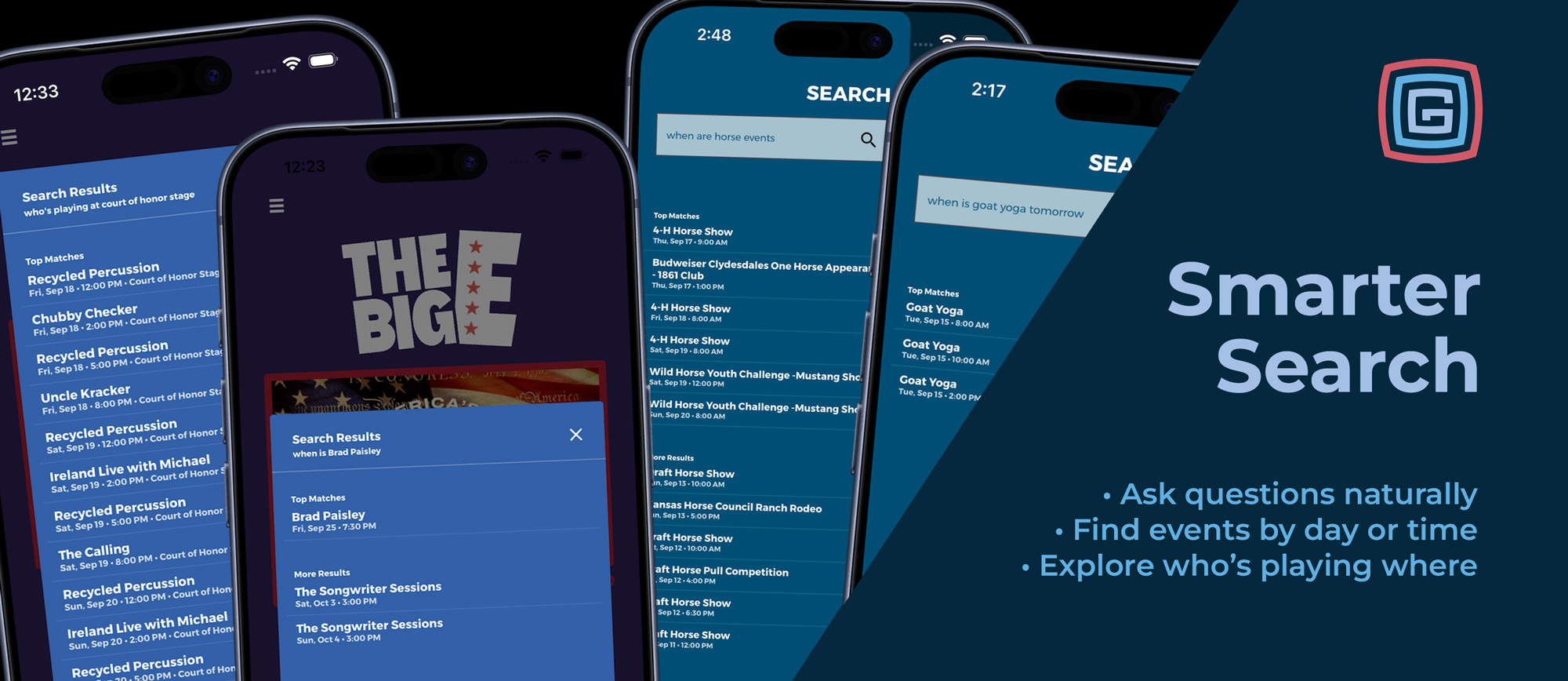
Find a performer, explore an interest, or plan your evening—all through Home Search.
Visitors often know what they want without knowing which page to open. They may be looking for a concert, wondering what’s happening tomorrow, or exploring the lineup at a particular stage.
Grandstand’s upgraded Home Search connects those questions with the content in your app. Improved matching, clearer results, and expanded natural-language support help visitors search using familiar words and questions.
Examples from The Big E and Kansas State Fair show five ways visitors can turn a simple question into useful event information.
Find a Specific Performer
“When is Brad Paisley?”
In The Big E app, that question brings Brad Paisley’s event into Top Matches, with its date and time displayed directly beneath his name. Visitors can see the key details before opening the full listing.
It’s a straightforward way to find a performance without browsing the entire schedule or knowing its exact listing title.
Additional matches remain available under More Results, keeping the strongest match prominent while allowing visitors to explore further.
Explore an Interest
“When are horse events?”
Visitors don’t always have a specific show in mind. They may simply want to find activities related to an interest.
In the Kansas State Fair example, this question returns horse shows, a Clydesdales appearance, and other relevant activities. Upcoming matches appear prominently, while past matching events remain available under More Results.
Search can match event titles, categories, tags, locations, and descriptions, helping visitors discover activities without knowing their names in advance.
Plan for Tomorrow
“When is goat yoga tomorrow?”
This question combines a specific activity with a timeframe. In the Kansas State Fair example, the results show three Goat Yoga sessions for the following day, with each start time clearly displayed.
Visitors can compare those options and decide which session fits their plans without sorting through occurrences on other dates.
Home Search also supports requests for today, this weekend, and written dates, such as “Show me concerts on September 20.” That makes it useful both before arrival and while planning another day at the event.
Discover What’s Happening Tonight
“What events are tonight?”
Sometimes visitors want options rather than a particular event. In the Kansas State Fair example, this search brings together evening activities ranging from performances and demonstrations to pig races and the demolition derby.
Search considers event timing to keep these results useful. Evening events and shorter activities continuing into the evening can qualify, while long-running daytime listings are kept from crowding the results simply because they end late.
Visitors can also narrow the request with a subject, such as “Show me concerts tonight,” or explore current activities by asking “What’s happening now?”
Explore a Stage’s Lineup
“Who’s playing at Court of Honor Stage?”
In The Big E app, this question returns performances associated with that stage, with dates, times, and the venue shown in the results.
It gives visitors another starting point for discovery. They can explore a familiar venue without needing to know who is performing there.
Location questions can also include a timeframe, such as “What’s happening at the main stage tonight?” or “What events are at the arena tomorrow?”
Search works in the other direction, too. Questions such as “Which arena is the rodeo in?” help visitors find where an event takes place.
Find Food, Vendors, and Facilities Too
The improvements extend beyond schedule discovery.
Home Search can find vendors through their names, tags, subcategories, subtitles, and descriptions. Questions such as “Who sells lemonade?” or “Where can I buy a hat?” help visitors find listings based on what they offer.
For facilities and destinations, visitors can ask “Where are the restrooms?” or “Find the information booth.” Matching map results open the relevant map and pin.
These connections help visitors reach useful information without first deciding which section of the app to browse.
Clearer Results and More Forgiving Matching
Visitors type quickly, especially during a busy event. Home Search now handles common variations more effectively, including capitalization, accents, punctuation, simple singular and plural differences, and minor typos.
Top Matches and More Results help organize the results so visitors can identify the strongest matches first. Schedule results also account for timing, keeping past events out of the top-match group.
Together, these improvements help visitors find useful content even when their wording does not exactly match a title in the app.
Put Discovery on the Home Page
Making search easy to reach matters.
At the Minnesota State Fair, adding embedded search to the home page made a major difference in how visitors used the app. It gave them a prominent starting point for discovery alongside the familiar navigation.
The expanded natural-language capabilities shown in The Big E and Kansas State Fair build on that approach, giving visitors more ways to express what they want to find.
Help Your Content Get Found
Useful, accurate content gives search more to work with. A few thoughtful updates can make a difference:
- Describe what vendors offer. Include specific foods, products, and services.
- Use meaningful tags and subcategories. Choose terms visitors are likely to search.
- Keep event dates, times, and locations accurate. These details support questions about when and where activities happen.
- Use clear map-location names. Name facilities and destinations in language visitors will recognize.
- Try common visitor questions. Search for a performer, an interest, a food, and a location to see how your content appears.
Choose How Visitors Access Home Search
Home Search and its improved natural-language features are available with Silver packages and higher, accessible through a slide-out menu from the home page.
With Gold packages and higher, you can alternatively embed the search box directly on the home page through Home Builder, giving visitors an immediately visible starting point for discovery.
Both options provide the same smarter matching and natural-language capabilities. Choose the placement that works best for your app’s design and visitors.
From finding a favorite performer to discovering something unexpected, smarter Home Search helps visitors make more of the content your team has prepared.
Interested in using Grandstand for your event? Schedule a demo to see how search, schedules, maps, and vendor listings work together.