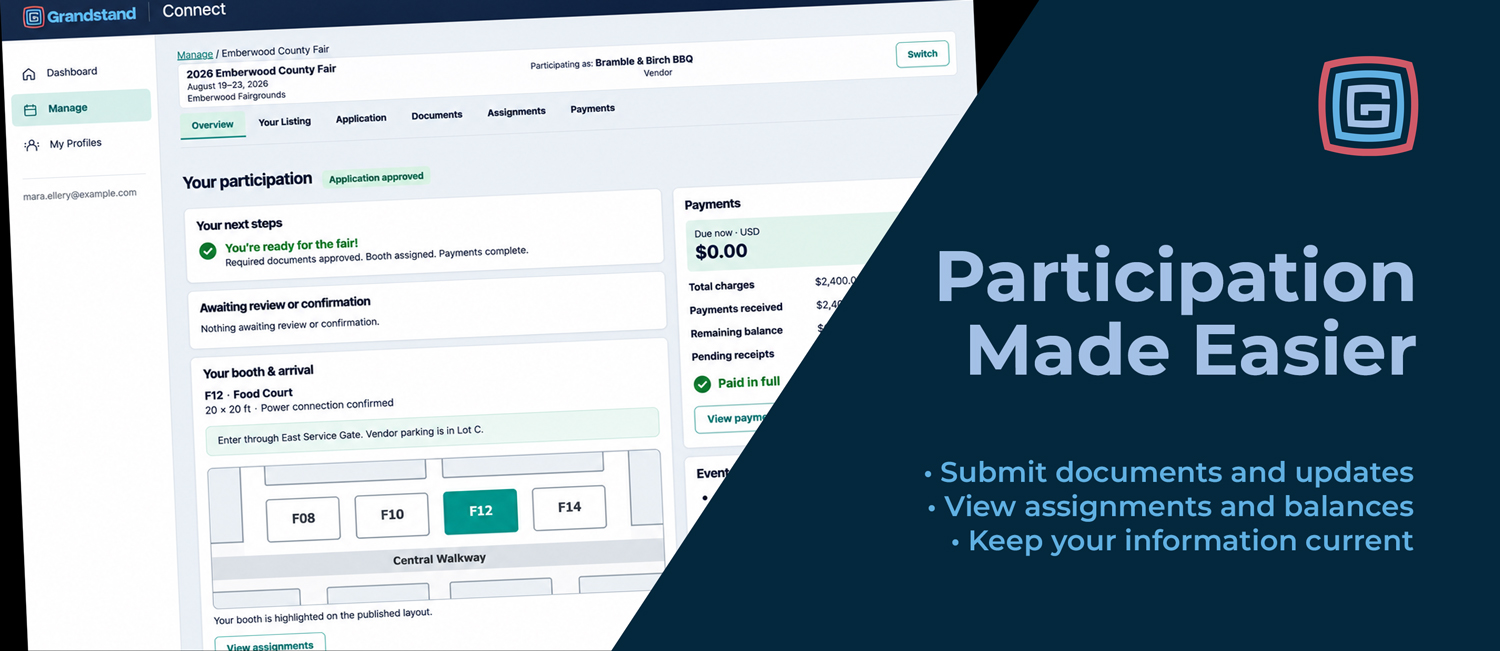
A food vendor preparing for a fair needs to know whether their paperwork is complete and where they’ll set up. A musician playing a porchfest wants to share a bio and check their performance location. A conference exhibitor needs to update their company listing. A community organization wants to get an upcoming event onto a local calendar.
Each is contributing something different. Each needs a clear way to share information with the team organizing or promoting their participation.
Grandstand Connect is our new participant management platform, built to support those exchanges. Participants have a dedicated portal to submit information, manage preparations, and contribute updates. Organizers review submissions, manage acceptance, and control what gets published.
Here’s what that experience can look like across events and communities.
Fairs and Festivals: From Application to Arrival
Imagine a barbecue vendor preparing for your annual fair.
Their first step is applying. Through Connect, they submit the information your team needs to evaluate their participation. Once accepted, they return to the portal to continue preparing.
There’s an insurance certificate to upload. A business description needs updating. They want to check their booth assignment and see whether a balance remains.
Those tasks often happen weeks apart. Having a place to return makes it easier for the vendor to pick up where they left off and see what still needs attention.
They can submit required documents and check their review status. Once your team publishes booth assignments, they can view their assigned space on the published layout and check any arrival instructions you’ve shared. Charges, recorded payments, and remaining balances help them understand where they stand financially.
Their public listing gets attention, too. Perhaps they’ve added a vegetarian option or have a better photo of their food. They can submit those changes for your team to review before publication.
For the vendor, Connect provides a clearer path to event day. For your office, it creates a shared reference for conversations about missing materials, assignments, and outstanding tasks.
The same approach can support commercial exhibitors, nonprofit booths, community groups, and other participants preparing to join your event.
Music Festivals and Porchfests: Letting Performers Contribute
Now consider a musician participating in a neighborhood porchfest.
The organizer needs a current bio, a photo, and links that help listeners discover their music. The musician already has those materials—and knows when they need to change.
Connect gives them a way to contribute that information directly. They can submit their profile details and return with updates for organizer review.
Perhaps a solo artist is now performing with a trio. A band has a new promotional photo. A website link has changed. Those updates can come from the performer, giving the organizing team current information to work with.
Once the organizer publishes a performance assignment, the participant can check their assigned location. At a porchfest, that might be a neighborhood porch. At a larger music festival, it might be a stage or performance area.
Organizers retain control over acceptance, assignments, and what becomes public. Performers contribute the details that help audiences understand who they are and what they’ll bring to the event.
That division of responsibility helps small volunteer teams and larger festival staffs gather richer information without having to write or reconstruct every artist profile themselves.
Conferences: Preparing Exhibitors and Speakers
At a conference, the participant experience can take several forms.
An exhibitor may need to submit a company description, logo, website, and required documents. As the conference approaches, they need to check their published booth assignment and review any charges or remaining balance.
Connect gives that exhibitor a place to manage those details. If their company description changes or a new logo becomes available, they can submit an update for review.
A speaker has a different set of contributions. Their profile might include a professional bio, headshot, and relevant links. They may also submit proposed schedule content for the organizing team to review.
For example, a presenter could provide a session title and description. Your team reviews that submission and decides what to publish to the connected event schedule.
The experience can reflect the information you collect from each participant type. Exhibitors contribute business information and prepare for their assigned space. Speakers contribute profile and session information. Your team oversees how those contributions become part of the conference experience.
Tourism and Communities: Participation Throughout the Year
Connect’s usefulness extends beyond a single event date.
A tourism organization or community guide depends on information from local businesses, attractions, and organizations. Those details keep changing throughout the year.
A restaurant has new photos and an updated description. An attraction changes its visitor information. A neighborhood organization announces a community celebration. A business wants to share a coupon.
Through Connect, participants can contribute listing updates, submit events, and create offers for review. The organization managing the destination app or community guide decides what gets published.
Consider a local shop that participates in a downtown guide. Its owner can submit revised business information when something changes. Later, they might submit a special event or an offer for visitors.
Meanwhile, a community organization can contribute an upcoming event without becoming an administrator of the entire guide.
This creates an ongoing way for local participants to contribute. The tourism or community team maintains editorial oversight, while the people closest to the information help keep it current.
Approved content can reach your connected Grandstand app and supported website widgets, depending on your setup.
What Happens After Someone Submits Information?
Across these examples, a key part of Connect is what happens between submission and publication.
Participants contribute information. Your team reviews it and controls what goes live.
An application, a required document, and a public listing serve different purposes. Accepting a participant doesn’t automatically mean every document has been approved or every listing update has been published.
Connect keeps those steps distinct so your team can manage each appropriately.
A vendor may be accepted but still need to provide a document. A performer’s profile update may be waiting for review. A community event submission may need approval before appearing on the public schedule.
Organizers handle those decisions through Grandstand Admin. Participants have their own workspace for contributing information and checking the preparations relevant to them.
A Clearer Next Step
For a participant, the questions are often practical: Where do I send this? Has it been reviewed? Where am I assigned? What still needs attention?
Connect brings those exchanges into a more consistent process, whether someone is preparing for opening day or keeping a local listing current throughout the year.
For organizers, it creates a way to invite contributions while maintaining oversight. Participants supply the details they know best. Your team decides how those details support the event or community you’re building.
See Grandstand Connect at IAFE
We’ll be demonstrating Grandstand Connect at IAFE in Louisville, November 30–December 1.
Stop by during trade show hours, or message us to arrange a 15-minute one-on-one demo outside show hours:
- Monday, November 30: 4:30–7 p.m.
- Tuesday, December 1: 9 a.m.–12:30 p.m.
All times are Eastern. Send us a preferred time, and we’ll confirm availability. Not attending IAFE? Contact us to arrange a walkthrough after the convention.
Explore Grandstand Connect at grandstandconnect.com.
Grandstand Connect is available as a paid add-on. Already using Grandstand? Ask us about adding Connect to the Admin you already know.